«Прямо с ветки» — это увлекательный проект, превращающий поездки в метро в захватывающую игру. Пассажир, собирает ягоды на разных станциях, чтобы затем получить бесплатные поездки. Визуально проект выполнен в ярком и радостном стиле, где ветки метро напоминают ветки деревьев, а станции — это фрукты.
«Прямо с ветки» призван добавить в поездки на метро элемент веселья и удовольствия.
Дарья Головятинская создала проект «Прямо с ветки», который превращает поездки в метро в интерактивную игру с ягодами и бесплатными поездками. Проект выполнен в ярком и радостном стиле, где ветки метро изображены как деревья, а станции — как фрукты.
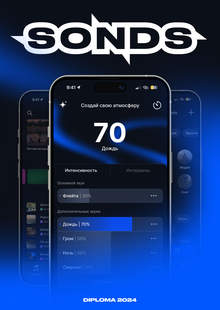
Лилия Самсонова создала приложение Sonds для генерации персональных звуковых атмосфер, которое помогает людям концентрироваться или расслабляться. Проект включает прототип в Figma, бренд, стайлгайд и несколько сценариев для использования приложения.
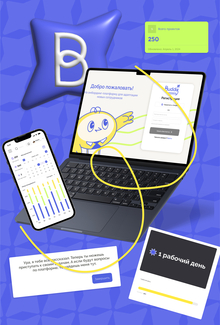
Ева Когут создала онбординг-платформу Hi Buddy для адаптации новых сотрудников в новых компаниях. Платформа использует геймификацию и интерактивные элементы для повышения вовлечённости и ускорения достижения полной производительности.
We use cookies to improve the operation of the HSE website and to enhance its usability. More detailed information on the use of cookies can be fou...
Show more
Press space bar to start a drag.
When dragging you can use the arrow keys to move the item around and escape to cancel.
Some screen readers may require you to be in focus mode or to use your pass through key
Press space bar to start a drag.
When dragging you can use the arrow keys to move the item around and escape to cancel.
Some screen readers may require you to be in focus mode or to use your pass through key
Press space bar to start a drag.
When dragging you can use the arrow keys to move the item around and escape to cancel.
Some screen readers may require you to be in focus mode or to use your pass through key
Press space bar to start a drag.
When dragging you can use the arrow keys to move the item around and escape to cancel.
Some screen readers may require you to be in focus mode or to use your pass through key
Press space bar to start a drag.
When dragging you can use the arrow keys to move the item around and escape to cancel.
Some screen readers may require you to be in focus mode or to use your pass through key
Press space bar to start a drag.
When dragging you can use the arrow keys to move the item around and escape to cancel.
Some screen readers may require you to be in focus mode or to use your pass through key
Press space bar to start a drag.
When dragging you can use the arrow keys to move the item around and escape to cancel.
Some screen readers may require you to be in focus mode or to use your pass through key
Press space bar to start a drag.
When dragging you can use the arrow keys to move the item around and escape to cancel.
Some screen readers may require you to be in focus mode or to use your pass through key
Press space bar to start a drag.
When dragging you can use the arrow keys to move the item around and escape to cancel.
Some screen readers may require you to be in focus mode or to use your pass through key
Press space bar to start a drag.
When dragging you can use the arrow keys to move the item around and escape to cancel.
Some screen readers may require you to be in focus mode or to use your pass through key